 Photinerary
Trip Planner
Build a trip day by day around the light, or describe it in a sentence and review a draft made from real places and real drives.
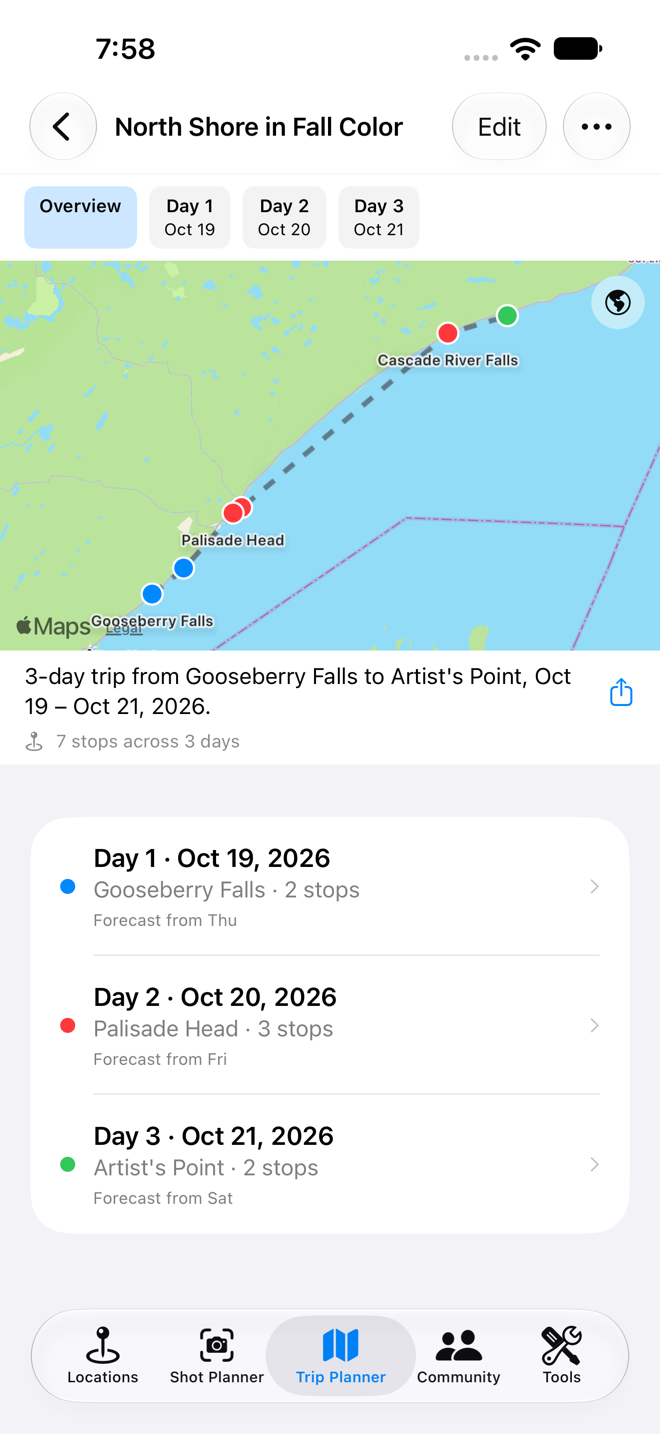
Create a trip by hand
- In the Trip Planner tab, tap New Trip › New Trip….
- Enter a name and the Start Date and End Date, then tap Create Trip. One day is made for each date.
- Tap Add Stop to add places; see the next section.
Add stops
Add Stop offers several sources:
- Saved Photo Locations: your own places.
- Search for a Place Instead: any place or address from map search.
- From the Community catalog PRO: thousands of photographed places.
- Sunrise, Tides, and More: light and tide events as stops of their own; see below.
- Custom Event: anything else, with a name, an optional address, and a date and time.
Choose Add to Day… to schedule it, or Add as Idea (No Day Yet) to keep it in the trip's Ideas until you decide.
Time each stop to the light
Edit a stop and choose its Time of Day: sunrise, midday, sunset, or a specific time. Photinerary works out the actual clock time for that place and day, so "sunset" on day 3 is that evening's real sunset there.
Sunrise, sunset, moon and tides as stops
- Tap Add Stop › Sunrise, Tides, and More.
- Pick the place once.
- Tick as many events as you want: sunrise, sunset, golden hour, blue hour, moonrise, moonset, astronomical twilight, and high and low tide.
- Tap Add. Each event lands on its day in time order, colored to match its tool.
Arrange the itinerary
- Tap Edit, then drag stops to reorder them within a day, move them to another day, or move them to and from Ideas.
- The summary above each day shows the total drive distance and time between its stops, from real routes.
- Tap a stop to edit its time, notes or place.
- Stops within five days show their sky reading PRO: sunrise or sunset color, or the night's clear window.
Plan a trip from a sentence
Requires a device with Apple Intelligence.
- Tap New Trip › AI New Trip….
- Describe the trip, for example "five days from Milwaukee to Duluth in October, waterfalls and lighthouses, sunrise on the lake".
- Set the dates if the sentence didn't, and tap Plan Trip.
- Under Review the Draft, check each day. Remove stops you don't want and add ones you do.
- Save it. Nothing is saved until you do.
For an existing trip, open it and choose AI Trip Planner… to draft or fill in its days.
What the planner does for you
- Real places only. Every place is looked up in Apple Maps and OpenStreetMap (and the Community catalog with Pro) before it's offered. The model chooses among real candidates; it can't invent one.
- Stops along the way. On a drive between areas, it looks for places along the actual route and spreads them so a long day isn't empty in the middle.
- Scenic routes. Say "scenic route", "back roads", "avoid the interstate" or "the long way" and it allows a slower road when that road passes more worthwhile stops. Otherwise it keeps to the fastest road.
- Timing. Sunrise and sunset stops get the real times, and other stops are fitted around them with drive times between.
- Places to stay. It adds a place to stay each night where the day's driving ends, with a check-in time worked out from the real drive.
Planning Details shows a log of how a trip was planned: what was searched, what was kept and why. If a plan looks wrong, sharing that log with us (Share Planning Details) is the quickest way to get it fixed.
Plan From a Photo
On iOS 27 devices with a vision-capable model, Plan From a Photo lets you pick a photo. The trip prompt gains a description like "places like this: lighthouses and rocky coastline, at sunrise", plus where the photo was taken if it knows.
After the trip is planned
- Remind Me tells you when to leave for each stop; see Reminders. Set Walk in & set up on a stop for the time you need from the car to the spot.
- Add Trip to Calendar puts every stop in your calendar.
- Share sends the day-by-day itinerary as text.
- Collaborate… PRO invites friends to plan it with you; see Planning together.
- When you've done it, Mark as Taken. Taken trips count toward your goals PRO.